Bender Realism
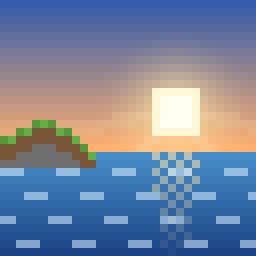
Make your Minecraft world look more real: rolling waves, real sunlight and long shadows, sunbeams, and movie-style color.
⬇️ Download for MinecraftVersion 1.0.1. For Minecraft Bedrock with Vibrant Visuals (most iPads from 2019 or newer). Works in every world, with or without other add-ons. Free, no ads.
Updating? Minecraft keeps old copies next to new ones. Use Bender Realism v1.0.1, and delete older copies in Settings → Storage.
What changes
Real waves
Lakes and oceans roll with moving waves, and sunlight ripples across the bottom. Water gets a natural color, and swamps stay murky.
Real sunlight
The sun crosses the sky at an angle like it does in real life, so shadows stay long and slanted all day, and shady spots are deeper.
Sunbeams
A light haze in the air lets you see rays of light through trees, windows and cave openings.
Movie colors
Colors like a film camera, with a soft glow around the sun all day, not just at sunrise and sunset.
How to put it on the iPad
- In Minecraft, go to Settings → Video → Graphics Mode and pick Vibrant Visuals. No Vibrant Visuals option? The iPad needs an A12 chip or newer: iPad 8th generation (2020) or newer, iPad Air 3 or iPad mini 5 (2019) or newer, or any iPad Pro from 2018 on.
- Tap Download for Minecraft above, then tap Download when Safari asks.
- Open the Files app, go to Downloads, and tap BenderRealism.mcpack. Minecraft opens and says Successfully imported.
If tapping the file doesn't open Minecraft, tap the Share button and choose Minecraft. - To use it in every world: Settings → Global Resources → My Packs → Bender Realism → Activate. Or for just one world: tap the pencil next to the world, then Resource Packs → Available → Bender Realism → Activate.
- Using Bender add-ons? Download them again from the arcade. They're now marked as ready for Vibrant Visuals, because older add-on packs can stop Vibrant Visuals from turning on.
Good to know
- Watch a sunrise or sunset by the ocean, or stand in a forest in the morning to see the sunbeams.
- If the world looks the same as before, check that Graphics Mode says Vibrant Visuals, and turn off any other texture packs one at a time to see if one is switching it off.
- Vibrant Visuals turns off in split-screen. That's a Minecraft rule.
- If the iPad feels slow or warm, lower Render Distance in Settings → Video.
- To go back to normal, deactivate Bender Realism in Global Resources. Nothing in your worlds changes.
- The Nether and the End keep Minecraft's normal look.